Forget the levels
Play your vision
Join professional DJs using waveAlign to eliminate track volume inconsistencies and deliver your artistic vision to the dance floor.
Invisible technology
Unforgettable performances
waveAlign normalizes your entire track library to the same loudness using state-of-the-art broadcast standards: the same used by Spotify, Apple Music, and Netflix. One processing before your gig creates a solid loudness foundation. Every move you make at the mixer becomes a creative choice, not a volume fix.
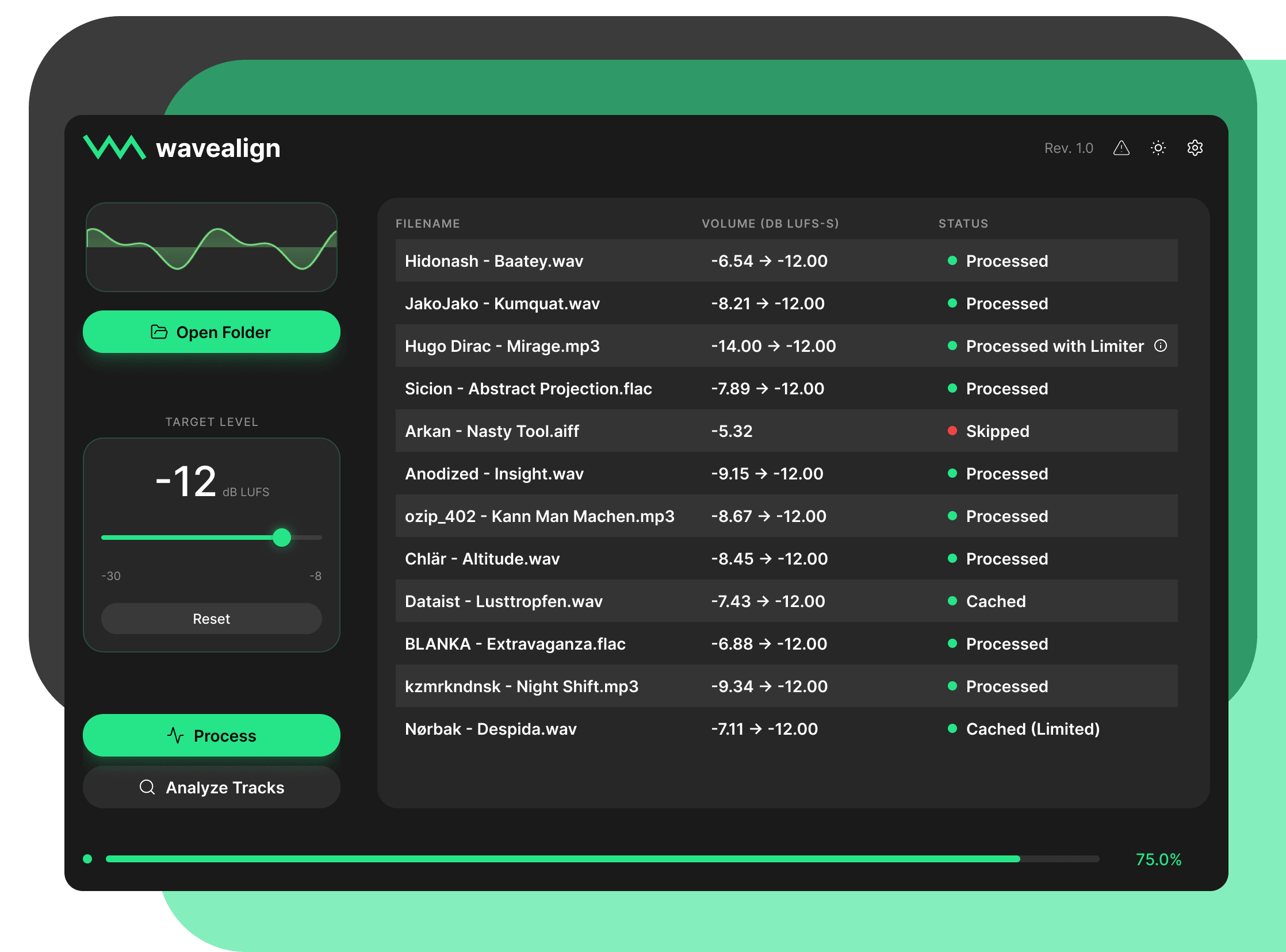
Every era
One foundation
Your musical vision doesn’t care about release dates, and neither should your tools. waveAlign’s transparent, production-grade limiter brings quieter tracks up to the same foundation. Without touching the dynamics, without distortion and without compromise.
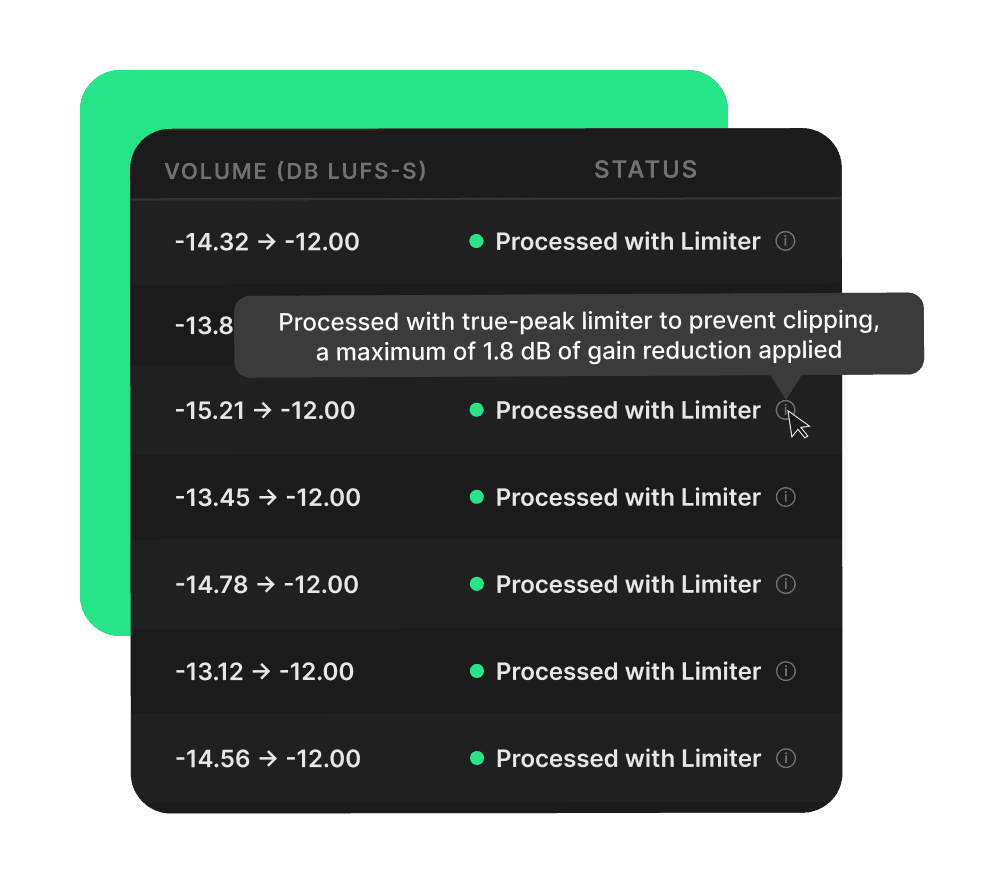
We handle the science
you handle the floor
Your Vision
Realized
Audiences hear even the smallest volume change.
waveAlign gives you a consistent foundation, so every transition is deliberate: an expression of where you want to take the floor.
Your Sound
Unaltered
waveAlign’s loudness algorithm is specifically chosen for the DJ context, because it captures how music feels, not just how it measures on a meter.
Your tracks sound balanced and consistent, while the original sound is preserved.
Your Library
Respected
Your library is your most valuable asset. waveAlign touches one thing and one thing only: the loudness.
Every cue point, tag, and playlist stays exactly as you built it, across formats and applications.
Professional standards
for everyone
World-famous DJs endorsing software they've never touched, paid to put their name on it. We don't do that. Every word below is from real DJs who use waveAlign in their actual workflow.
“I’ve been using waveAlign for a while now and it’s amazing! All of my sets sound professional and well balanced and I don’t have to adjust the trim manually every time anymore. Highly recommend this product to every DJ who struggles with preparation!”

“I was recording a set for an open call in Portugal. My first attempt was done without waveAlign and the loudness was all over the place. For the second recording I tried waveAlign and the experience was transformative: I barely had to touch the trim, letting me focus entirely on the mixing and artistic flow of the set.”

“The impact this has on my playlist and my song preparation is huge. The ability to always have any song I want without worrying about its loudness and quality is such a game changer for me.”

“waveAlign really sped up my preparation workflow: I have lots of ripped vinyl that isn’t available digitally. Processing those tracks to ensure they match modern loudness has always taken me a lot of time. However since using waveAlign the process takes seconds. When I export to my USB I simply process through waveAlign and now even older tracks compare super well to modern ones!”

“waveAlign has transformed my set preparation. Before, I manually analyzed and adjusted track gains for consistent energy levels. Now waveAlign handles the heavy lifting and brings reliable consistency. The recent limiter refinements increased output quality, especially for dense psytrance basslines. It lets me focus on the creative side of DJing: track selection and mixing.”

“So I been using waveAlign for a few weeks now and I played at a big gig a few weeks ago and I was nervous as I have never used waveAlign live before. It didn’t let me down: all my tunes came out at the same level, so no messing around with volume. I have full trust in waveAlign! It’s so easy to use! ⭐⭐⭐⭐⭐ From me!”

“I’m using waveAlign regularly and I’m super happy about it. The UI is well-arranged and functionality easy to understand. It became a solid part in my set preparation workflow and I’m using it almost every week. It works quick and easy supporting me to prepare my sets properly. A very useful tool for DJs!”

“I’ve been using waveAlign for a while now and it has been a game changer. I always had issues where I was constantly adjusting the trim between tracks that were modern and mastered versus SoundCloud edits. Now, I don’t have that problem. My overall experience has been incredible and makes my job behind the decks easier.”

“As a DJ, I really appreciate the idea behind waveAlign. When the processing works, it significantly speeds up my preparation workflow and helps me maintain a consistent energy level across my library. It’s a tool with great potential to become an essential part of every DJ’s toolkit.”

“I have been using waveAlign extensively for both live performances and private sessions. I’ve found it incredibly useful for reducing track transition times. Previously, I had to match gains manually due to the disparity in LUFS levels; now, I can ensure loudness consistency, which allows me to be more agile and focus on the creative side of EQing.”

“I wanted to thank you for this app! I discovered it before a very important gig where I played only vinyl rips and it made everything sound great, no issues with volume discrepancy and overall gave it more character ❤️”

“waveAlign is an excellent piece of software that has helped me normalize the audio volumes of my MP3s, preventing audio clipping and mixer LEDs constantly flashing red! The best thing about it is that the processed MP3 tracks don’t need to be reanalyzed by Rekordbox, and CDJ players read my USB flash drives or SSDs without any problems!”

“I tested waveAlign in my DJ preparation and it helped me organize my tracks faster. The volume balance between tracks became more consistent, which makes my sets smoother and easier to mix. Before using waveAlign, some tracks sounded louder than others during transitions. After processing them, the levels are more controlled and the mix feels cleaner.”

“I’ve been using waveAlign for a while now and it’s amazing! All of my sets sound professional and well balanced and I don’t have to adjust the trim manually every time anymore. Highly recommend this product to every DJ who struggles with preparation!”
“I was recording a set for an open call in Portugal. My first attempt was done without waveAlign and the loudness was all over the place. For the second recording I tried waveAlign and the experience was transformative: I barely had to touch the trim, letting me focus entirely on the mixing and artistic flow of the set.”
“The impact this has on my playlist and my song preparation is huge. The ability to always have any song I want without worrying about its loudness and quality is such a game changer for me.”
“waveAlign really sped up my preparation workflow: I have lots of ripped vinyl that isn’t available digitally. Processing those tracks to ensure they match modern loudness has always taken me a lot of time. However since using waveAlign the process takes seconds. When I export to my USB I simply process through waveAlign and now even older tracks compare super well to modern ones!”
Buy once
use forever
Every feature included. No paywalled upgrades, no tiers. Built specifically for DJs who care about how their sets sound.
Trusted by more than 7000 DJs globally since its beta phase.
Available for Windows 11 or later and macOS 11 or later.
- Full loudness normalization
- Production-grade limiting
- Batch processing
- MP3 / WAV / AIFF / FLAC
- Metadata preserved
- Pay once, own it forever
Common
questions
Everything you need to know about waveAlign.
Can't find the answer? Reach out to our support team.
contact@wavealign.app
It normalizes every track in your library to the same perceived loudness using the BS1770 LUFS standard. No more surprise volume jumps between tracks. Every song starts from the same baseline.
No. If a track only needs to be turned down, waveAlign simply applies gain adjustment without any effect on dynamics. If a track needs to be turned up, waveAlign includes a limiter to catch any clipping, but it is tuned to be as transparent as possible. The goal is always to leave your music sounding exactly as it was mastered.
Yes, and that's the point. waveAlign gives you a consistent baseline so every gain adjustment you make is a creative choice, not you compensating for a track that's suddenly too quiet or too loud.
Most auto-gain features use compression or limiting to hit their target, which changes how your tracks actually sound. waveAlign uses pure LUFS-based normalization with a transparent limiter only where strictly necessary, no squashing, no artifacts.
Never. waveAlign only writes loudness metadata to your files. Everything else in your library stays exactly as you built it.